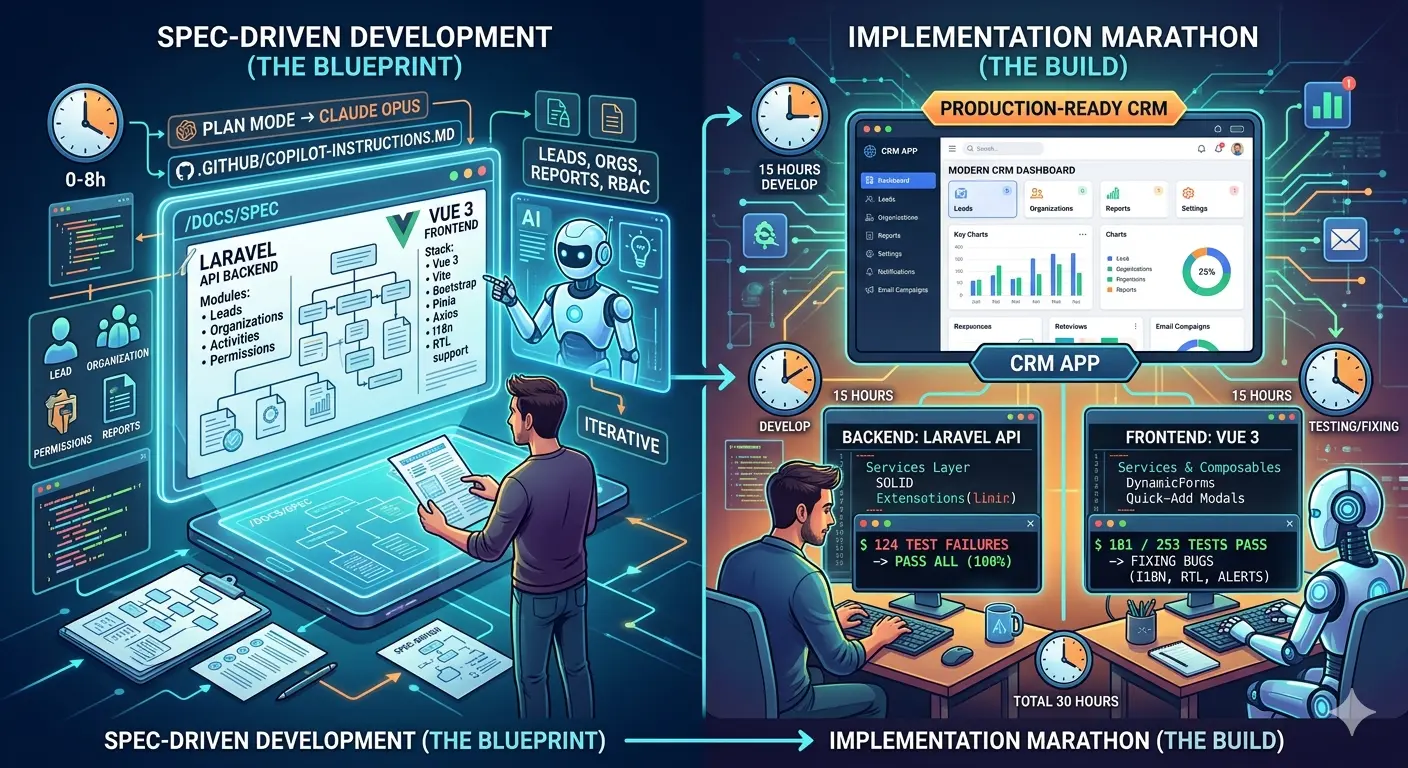
Part 1: The Blueprint Phase
Building a CRM is a massive undertaking. The features can feel endless: leads, organizations, activity tracking, notifications, reporting. When I decided to build mine using a Laravel API backend and a Vue.js frontend, I didn’t start with php artisan make:model.
Instead, I started with a conversation.
The Strategy: “Planning Mode” Over “Coding Mode”
Most developers use AI to fix a bug or write a single function. For this project, I wanted to leverage Spec-Driven Development (SDD). The goal was to define every business rule, relationship, and requirement in a documentation folder (/docs/spec) before writing a single controller.
I opened my workspace in VScode, triggered Claude Opus 4.6 in planning mode, and began the iterative process of “feature discovery.”
The Evolution of the Spec
1. The Initial Foundation: defining the Core
My first prompt was broad: @workspace /plan "Create a specification for a Laravel CRM API including Leads and Organizations. Use a spec-driven approach." The AI scanned the empty project and suggested the essential modules: Leads, Lead Activities, Contacts, and Organizations.
2. Adding Security and Insights: permissions & reporting
A CRM needs structure. I asked to integrate spatie/laravel-permission for RBAC (Role-Based Access Control) and requested a reporting engine to track user performance, company health, and customer growth.
3. Closing the Loop: post-sales lifecycle
The “After-Sales” phase is where most CRMs fail. I challenged the AI: “If we want to follow a customer after a sale is won, what should we do?” It revised the plan to include post-sale activity tracking and service logs, ensuring the app remains useful throughout the entire customer lifecycle.
4. Utility and Scaling: the final polish
We finalized the spec by adding “The Essentials”: notifications, reminders, marketing email campaigns, file attachments, and data import/export tools.
Teaching the AI How to Code
Once the specs were finalized in /docs/spec, I did something crucial for long-term project health. I asked the AI to create a .github/copilot-instructions.md file.
The Prompt:
"Based on the specs in /docs/spec, create a .github/copilot-instructions.md file. Define the rules for our coding style and architecture."
This file acts as the “brain” for the AI during the implementation phase. It ensures that every time I ask it to generate code, it remembers our specific architecture, follows our established naming conventions, and respects the business logic we spent hours planning.
Ready for Implementation
With the documentation written and the AI “trained” on our specific requirements, the project moved from the abstract to the concrete.
We weren’t just guessing anymore. We had a map. I gave the final command: “Let’s start phase by phase.”
Part 2: The Implementation Marathon & Frontend Integration
In Part 1, we covered how to use AI to build a comprehensive technical specification. But specs are just paper until you write code. In this second phase, I moved into the “marathon” of the project: 15 hours of AI-assisted coding, testing, and the eventual bridge between the Laravel API and a Vue 3 frontend.
The Backend Marathon: 8 Hours, 124 Tests
The implementation of the Laravel API was a lesson in persistence. Working phase-by-phase, I guided the AI through the development of the core CRM logic.
This wasn’t a “magic button” process. It was a rigorous loop:
- Phase Execution: The AI generates code based on a specific chapter of the
/docs/spec. - The Failure Loop: During the initial build, I hit 124 test failures.
- The Correction: Instead of manually fixing every line, I pointed the AI back to the spec. We analyzed the failures, adjusted the logic, and iterated until the test suite turned green.
Key Takeaway: Those 124 failures weren’t a sign of AI incompetence; they were the boundaries of the spec being tested. In an AI-first workflow, automated tests are the only way to ensure the AI hasn’t hallucinated logic in a complex system.
Shifting to the Frontend: The Vue 3 Bridge
Once the API was stable, it was time to build the interface. To save time, I didn’t start from scratch. I copied my API documentation into a new Vite + Vue 3 workspace.
I used a high-level architectural prompt to set the “Rules of Engagement” for the frontend:
`@workspace /specify "Study the existing Laravel API in this workspace and create a comprehensive specification for a Vue.js 3 frontend.

Technical Stack: > - Vue 3 (Composition API) + Vite

Bootstrap 5 + Bootstrap Icons

Pinia for State Management

Axios for API communication

I18n for Multi-language (English/Arabic LTR/RTL support)

Architectural Requirements:

Reusable Components: Create specs for a 'BaseDataTable' (with sorting/filtering), 'BaseButton', and 'BaseCard'.

Form Logic: Implement a 'DynamicForm' component. If a field has a relationship (e.g., Lead belongs to Organization), include a 'Quick-Add' modal to create the related item without leaving the current form.

Clean Code: Follow SOLID principles. Use a 'Services' layer for API calls and 'Composables' for shared logic.

UI/UX: Focus on a 'Dashboard' layout with a sidebar. Ensure RTL support is baked into the CSS structure for Arabic.

Output: Create the frontend spec in /docs/frontend-spec.md and update .github/copilot-instructions.md with Vue.js coding standards."`
By generating a frontend-spec.md and updating the .github/copilot-instructions.md, I ensured the AI understood the Services layer and Composables pattern before it wrote its first component.
Debugging via the Spec
The final test of the “Spec-Driven” approach came during integration. When I encountered a bug in the frontend, I didn’t just describe the error. I pointed the AI to the specific section of the spec that was being violated.
The Workflow:
- Identify: “The Lead-to-Organization relationship isn’t saving correctly.”
- Reference: “Look at
/docs/spec/leads.md.” - Fix: The AI would then realize where the frontend service was out of sync with the API requirements.
Final Reflections: The Senior Dev Mindset
Building a full-stack CRM in 30 hours—split evenly between 15 hours of active development and 15 hours of rigorous testing and refinement—is only possible if you shift your mindset. You have to treat the AI as a Senior Developer that requires clear architectural requirements, not a junior who needs constant hand-holding.
By investing heavily in Specifications and .github/copilot-instructions.md files upfront, I built a system where the AI could “self-correct” against the documentation. This allowed us to iterate through 124 test failures in the backend and 70 test failures in frontend without manual intervention for every line of code.
If you want to scale your development velocity without sacrificing code quality, the path is clear: Stop coding first. Spec first, then implement.